Showing posts with label great products. Show all posts

Thursday, May 1, 2014

PLxSU and Project Life Cell Phone Photo Resources

So you want to use all your awesome everyday photos in your Project Life album? Yay! But, if you're anything like me, you probably find yourself reaching for your smart phone more than your Cannon or your Nikon, right? Well, fear not! Let's finally get those photos off your phone and into a beautiful scrapbook!

I get photos from my DSLR camera printed at a local photo and art supply store because I love their print quality. Now, don't get me wrong, I know that my iPhone can certainly take some very good photos! But most of mine are taken in the evenings in not-so-stellar lighting conditions. I also organize my Project Life spreads weekly (see more about how I do PL here) so I'm printing a lot of photos and I want to keep my costs down. So I use photo printing apps right on my phone - They're quick and easy and inexpensive!


PostalPix

The app that I use for most of my photos is called PostalPix. It's another free app that lets you upload photos straight from your phone. Then they mail your prints right to your door! It's not stellar quality, but it's certainly not bad, and it suits my purposes just fine. They offer several print sizes - I use them for my 4x6 and 4x4 prints. I think the 4x4's will be fun to play with since the Stampin' Up! Project Life page protectors are the first to have 4x4 pockets! 

Prints will run you about 20¢ to 30¢. Shipping is reasonable, and shipping time is generally quite fast.   You can pay with PayPal or a credit card. The app is very user-friendly and it doesn't take much time at all to get your prints uploaded. 


Kanvess

If you have an Instagram account (it's a cool photo editing app that I, for one, am obsessed with), there's a really great app called Kanvess that pulls photos directly from your Instagram feed. It's the same deal - pay through the app and they send your photos to you. They only have one option: just-under-3" square prints with a white border that are totally adorable. (I love this size when I want to put a photo and a short bit of journaling on a 3x4 card.) Their prints are slightly more expensive, but they send coupons with your orders sometimes and their customer service is top-notch. (They replaced two orders that got lost in the mail free of charge, no questions asked!) The quality of the prints is quite nice too. 

Now let's talk about prepping your photos for printing. The original idea of Project Life was for 4x6 photos with 3x4 journaling cards. The very first page protector design (Design A or, as Stampin' Up! is calling it, Design 1) is four 4x6 photos with spaces in the middle for four 3x4 journaling cards - one card to journal about each of the photos. Project Life has come a long way since it's first days (although I have to say this stalwart is still one of my fave page designs), and it can truly be whatever you want it to be. I've already talked about 4x6, 4x4, and 3x3 photos, but I also like to use 3x4 photos. If you print your photos at home, you can resize them in your editing program and print at whatever size you like. But what if you, like me, don't print your own photos at home? 

To get my 3x4 photos, I put two photos on one 4x6 print. Now hold on, bear with me. It's way easier than it might seem!

Becky Higgins' blog (she's the creator of Project Life) recently featured a great tutorial on how to get two 3x4 photos on one 4x6 print. You can see the whole blog post here: http://bit.ly/1pUhopa That post describes several ways to accomplish 2 photos on one print in many different popular photo editing programs. But since we're talking about phone apps here, let me tell you more about the method I use.

PicFrame

The app is called PicFrame and it's another free app that's available on Android or iPhone. Once you create the 2-in-1 photo, you then save it to your phone and you can print it however you like. (Make sure to read the part of the tutorial about saving with the highest resolution!) I upload my prints to PostalPix, as I described above. Then you just cut the finished print in half. Easy peasy! :) And remember that PicFrame lets you put borders on your photos too, if you like that look. I use this app for 3x4 photos, and also sometimes to put multiple pictures on a square 4x4 print that I also get from PostalPix. 

This method is explained in more detail on Becky Higgins' blog here: http://beckyhiggins.com/wp-content/themes/beckyhiggins/assets/pdf/documents/bh_3x4on4x6_picframetutorial.pdf

Anyway, I know that's a lot of info, but my best recommendation is to download the apps and just start playing with them. It took me a while to get onto a system, but I've found that these apps work really really well for me.Give me a holler if you have any questions! And don't forget - you can order Project Life by Stampin' Up! starting TODAY (May 1)!! Check out my video for more information on how I do Project Life, and for a guided tour of the new Project Life by Stampin' Up! line. You can watch it below, or on my YouTube channel.


Happy Scrapbookin'! :)

Friday, November 29, 2013

Stampin' Up! Holiday SALE


If you're like me, the thought of Black Friday shopping probably made you crawl deeper into your warm bed this morning. Stampin' Up! has your answer! Now through Monday, get up to 50% off a great selection of Stampin' Up! products. Check all your crafty friends off your list today - hassle free! Maybe you'll even find a little to-me-from-me gift that you can't resist! ;) 


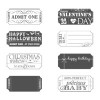
You'll find Christmas and holiday items, everyday items, even some great money-saving bundles that are exclusive to this sale! Here are a few of my fave items


Check out all the great deals over at my online store, and don't mess with the Black Friday stress! :)

Friday, October 25, 2013

25% OFF STAMP SETS!


Quick announcement about a majorly amazing deal from Stampin' Up! Through October 28th ONLY -  that's this Monday - you can get 25% off 25 favorite stamp sets!  WHOA! :) This is valid on both the wood mount and clear mount versions of all 25 sets. Visit my website to check them all out - you can place an order online or contact me to order.


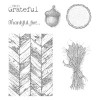
Here are a few of my favorites that are featured in this awesome promotion.


Sunday, September 29, 2013

Start-to-Finish Sunday #35 - Envelope Punch Board and 3x3 Card

Happy Sunday evening my friend! Videos are back - Can't believe I've been absent from YouTube for SO long! Our schedules here are slowing way down, so I hope to get back into sharing videos regularly.

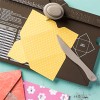
For today, I wanted to share a brand new product from Stampin' Up! This was something they introduced at Convention and it is so awesome!!! It's called the Envelope Punch Board, and you can use it to effortlessly make custom envelopes in no time flat. And you can make 66 different sizes of envelopes with this thing! WOW!


So I decided to start small - literally :) - and make a 3x3 card with a coordinating envelope. I obviously had to use the Magnificent Maple stamp and Sweater Weather DSP - seems I'm a little, um... well, obsessed with this combo!


Stay tuned in the next couple days for some more projects featuring this stamp/DSP combo. I need to force myself to use something else soon! ;)

You can watch the video below, or over on my YouTube channel. If you have any questions, please feel free to contact me. (Remember: you won't find the Envelope Punch Board in any current SU! catalogs. You can find it here: http://bit.ly/1bkHNWj) Oh, and ignore that it says STFS #34 in the video - I didn't catch the mistake until I'd already uploaded it.)


I've also got a great mini-series of Fall/Thanksgiving home decor projects coming up soon... I've got a lot in the works and plan to post one project at a time as I go. I don't want to toot my own horn, but these are some of my favorite projects I've made in a long time! :)

Thanks for stopping by today. I hope you have a great week. Happy Stampin'! :)


Supplies used in today's project:


Sunday, July 28, 2013

Embossing Folder Love!

Hey there! So... no Start-to-Finish Sunday video today. (Sorry!) Why, you ask? Well, because I'm kicking off my annual Christmas in July week a day early! Today is my Intro post over on Catherine and Cathy Create, and I decided to share one of my favorite things: Textured Impressions Embossing Folders from Stampin' Up! And I wanted to create a bonus card featuring an embossing folder and some of the new Holiday Catalog goodies that you'll be able to shop for on August 1st! So check it out...


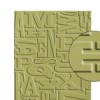
I used one of my favorite embossing folder techniques on this card. It's so easy and just takes a few extra seconds. You just ink the folder itself either with a brayer, or by swiping the ink pad directly across the folder, carefully place your cardstock inside, and run it through your Big Shot just like normal. (Check out my video tutorial on this technique.) For this card I used the Beautifully Baroque embossing folder.


Here's a close-up of the results of this technique. Isn't that pretty? And it's even more stunning in person. I love it with this tone-on-tone effect (this is Baked Brown Sugar cardstock and ink), or you can mix and match colors for a totally different look.

And here's where that sneak peek comes in! :) Three things here that you'll be able to shop for on August 1st - that's this Thursday! You can see here two stamp sets, Wonderful Wreath (#132748 wood only) and Christmas Messages (#131790 wood/#131793 clear), and one of the DSP collections, Season of Style. So pretty!


And this is the card I shared on Catherine and Cathy Create. I just love how a little bit of embossing can instantly elevate a simple card! If you've already been over to Catherine and Cathy Create, you may be here because I promised a supply list for this card. So, without further ado, here it is! Thanks for stopping by, and I hope you'll be back tomorrow through Friday for 5 wonderful Christmas in July projects! :)


Eat the Cake Birthday Card Supplies